

If your microwave not heating issue happens even though the light, fan, or turntable still works, start with simple checks such as the power level, Demo Mode, wall outlet, and door latch before assuming an internal part has failed. A microwave not heating food but running can also point to a faulty door switch, thermal protection device, high-voltage diode, or magnetron. This guide from BlueStars Parts explains what to do when a microwave is not heating food, which symptoms help identify the cause, and when professional repair is the safer option.
Quick Answer: Why Is My Microwave Not Heating?
If your microwave is not heating up, first check the power level, Demo Mode, wall outlet, and door latch. If those are normal, the problem may involve the door interlock switch, thermal fuse or cutoff, high-voltage diode, magnetron, capacitor, or transformer.
| Symptom | Likely Cause | Check First |
|---|---|---|
| Microwave runs but food stays cold | Setting, door switch, or heating circuit | Power level, Demo Mode, door |
| Turntable spins but no heat | Door switch or high-voltage failure | Door latch, professional diagnosis |
| Light and fan work but no heat | Demo Mode or heating circuit issue | Mode setting, door |
| Microwave warms food very slowly | Low power setting or weak heating system | Power level, food load |
| Loud hum or buzzing | Diode, magnetron, or transformer | Stop use and service |
| Stops shortly after starting | Thermal protection or control issue | Reset, airflow, service |
1. Check These Simple Issues Before Assuming a Part Has Failed
If your microwave is not warming food, start with the simplest checks first. A microwave can appear to run normally while failing to heat because of a low power setting, Demo Mode, an outlet problem, or a door interlock issue.

1.1. Power Level Is Set Too Low
A microwave may run normally but heat very slowly if the power level has been reduced for defrosting, softening, or reheating.
What to check:
- Make sure the power level is set to High or 100%.
- Check whether a low-power mode such as 10%, 20%, or Defrost was selected accidentally.
- Try heating a cup of water at full power for a short test cycle.
If the microwave heats normally at 100% power, the issue was likely a setting rather than a failed component.
1.2. Demo Mode or Showroom Mode Is Enabled
Demo Mode allows the display, fan, light, and turntable to operate without activating the heating system. This can make the microwave look normal even though it produces no heat.
What to check:
- Look for Demo, Showroom, or similar mode indicators on the display.
- Check the owner's manual for the correct steps to disable Demo Mode.
- After disabling it, run a short heating test with a cup of water.
If the lights and turntable work but the food stays completely cold, Demo Mode is worth ruling out before diagnosing internal parts.
1.3. The Microwave Is Not Getting Full Power
A microwave needs a stable power supply to operate correctly. Extension cords, overloaded power strips, or outlet problems can cause abnormal operation.
What to check:
- Plug the microwave directly into a grounded wall outlet.
- Avoid using an extension cord or power strip.
- Check whether the circuit breaker has tripped or is unstable.
- If possible, test the outlet with another appliance.
If the microwave repeatedly loses power, resets, or behaves abnormally, the outlet or household electrical circuit may need inspection.
1.4. Door Latch or Door Switch Is Not Engaging Properly
Microwaves use multiple door interlock switches to confirm that the door is safely closed before allowing the heating circuit to operate.
Food debris, a damaged latch, misaligned door, or faulty switch can prevent proper engagement.
Common signs:
- Microwave starts but does not heat
- Door feels loose or does not close evenly
- Heating works only when the door is pressed or repositioned
- No normal clicking sound when the door closes
What to check:
- Clean food debris from the latch and door-contact area.
- Close the door firmly and check whether it latches normally.
- Inspect the door hooks and latch area for visible damage.
- Do not bypass or hold down the door switches manually.
If the door does not close or latch correctly, see Microwave Door Won’t Close? Easy Troubleshooting Guide for more specific checks.
1.5. Reset the Microwave
A temporary control-board glitch can sometimes cause the microwave to behave incorrectly even though no hardware has failed.
How to reset:
- Step 1: Unplug the microwave from the wall outlet.
- Step 2: Leave it unplugged for a few minutes.
- Step 3: Plug it directly back into the wall outlet.
- Step 4: Reset the clock and cooking settings if needed.
- Step 5: Heat a cup of water at full power to see whether normal heating returns.
If the microwave is not heating up after these checks, the problem is more likely to involve an internal component such as the door switch, thermal protection device, diode, magnetron, capacitor, or transformer.
2. Internal Parts That Can Cause a Microwave to Run but Not Heat
If the basic checks in Section 1 are normal but your microwave is not heating food but runs, an internal component may have failed. Common causes include the door interlock system, thermal protection device, high-voltage diode, magnetron, capacitor, or transformer.
Because several of these parts belong to the microwave's high-voltage circuit, do not remove the outer cabinet or test internal components unless you are trained to service microwave appliances.
2.1. Door Interlock Switch or Latch Bracket Is Faulty
Microwaves use multiple door interlock switches to confirm that the door is safely closed before the heating circuit can operate. A damaged latch or latch bracket can prevent these switches from engaging correctly, even when the door appears to close.
Common signs:
- Microwave starts and counts down but does not heat
- Turntable, fan, or light still works
- Heating works intermittently when the door is repositioned
- Door feels loose or does not latch consistently
- Microwave starts or stops unexpectedly when the door is moved
What to do:
- Step 1: Stop using the microwave if the door does not latch securely.
- Step 2: Inspect the visible latch hooks and door alignment for damage.
- Step 3: Clean any food debris around the latch area.
- Step 4: Do not bypass, tape down, or manually hold the interlock switches.
- Step 5: Have the door-switch assembly tested if the latch looks normal but the microwave still does not heat.
If inspection confirms a damaged latch-support component, the 8205451 / WP8205451 Microwave Door Latch & Switch Bracket is designed for select Whirlpool, KitchenAid, Maytag, Amana, Kenmore, and related microwave models. It holds the door micro-switches in alignment so the safety interlock system can detect when the door is properly closed. Always verify your model and original part number before ordering.
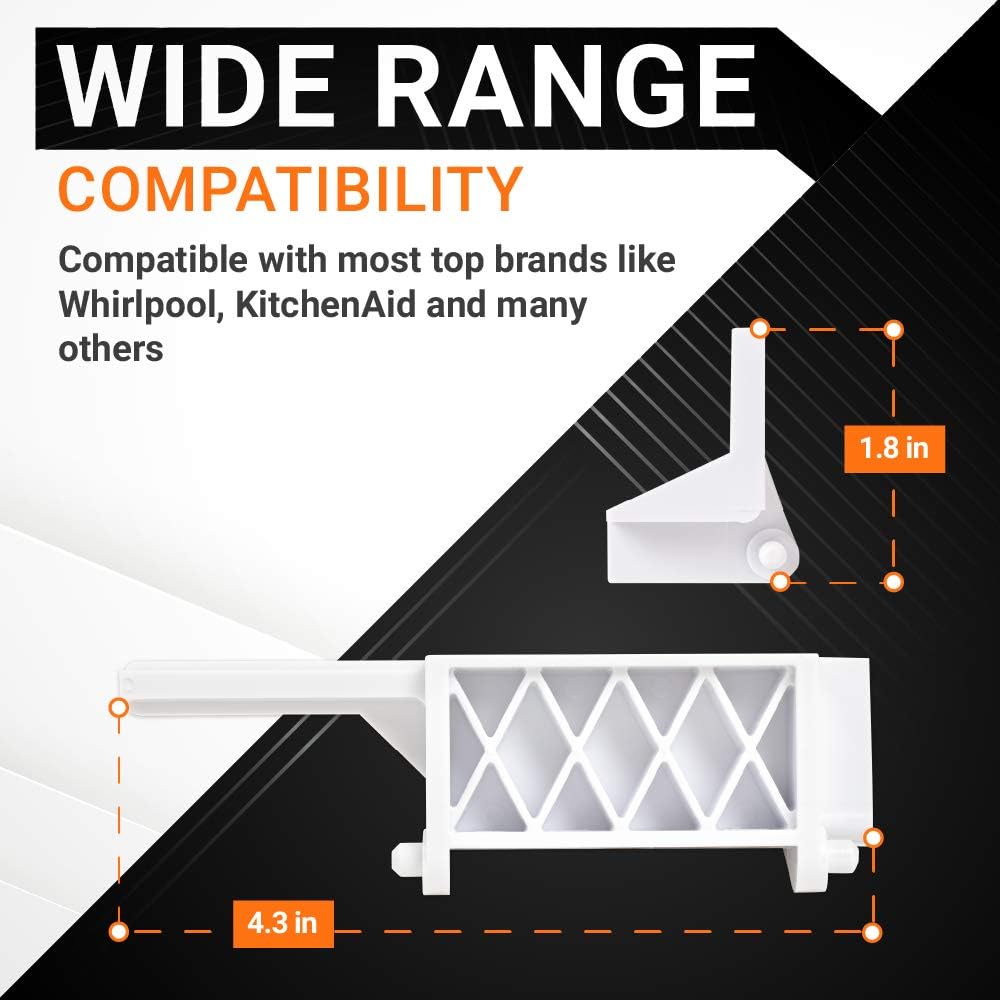
8205451 / WP8205451 Microwave Door Latch & Switch Bracket
For select Frigidaire, Electrolux, Kenmore, Westinghouse, and related models, the 5304522796 Microwave Door Latch may be suitable when the door latch itself is worn, broken, or no longer engaging correctly. Confirm model compatibility before replacement.
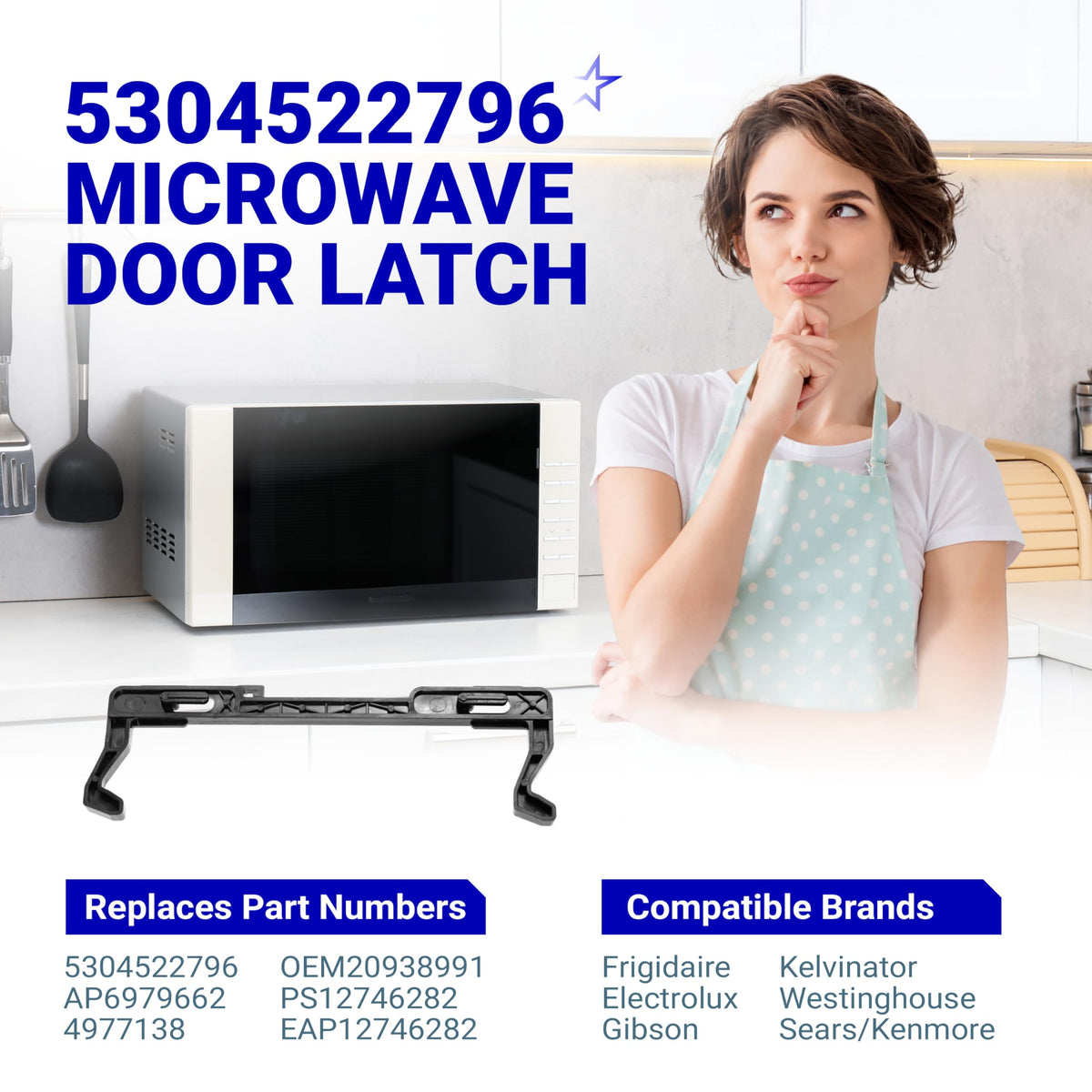
5304522796 Microwave Door Latch
2.2. Thermal Fuse or Thermal Cutoff Has Failed
Microwaves use fuses and thermal protection devices to interrupt power when an unsafe electrical or overheating condition occurs. The exact symptom depends on the microwave design and which protective device has failed. A main line fuse often causes a complete loss of power, while some thermal cutoffs may interrupt specific circuits.
Common signs:
- Microwave suddenly stops heating
- Unit shuts down during operation
- Microwave loses power completely
- Heating does not return after a reset
- Problem began after overheating or blocked ventilation
What to do:
- Step 1: Unplug the microwave and allow it to cool.
- Step 2: Make sure the exterior ventilation openings are not blocked.
- Step 3: If the microwave has completely lost power, rule out the outlet and breaker first.
- Step 4: Have the correct fuse or thermal cutoff identified and tested before replacing it.
If a fuse-related failure is suspected, see How to Replace Fuse in Microwave: DIY Safety Guide for more information.
Important: A blown fuse may be a symptom rather than the root cause. If a replacement fuse fails again, the microwave should be professionally diagnosed.
2.3. Waveguide Cover Is Dirty or Damaged
The waveguide directs microwave energy from the magnetron into the cooking cavity. A protective waveguide cover inside the microwave helps keep grease and food debris away from this area.
When the cover becomes heavily soiled, burned, cracked, or damaged, it can contribute to poor heating performance and may cause sparking or arcing.
Common signs:
- Food heats unevenly
- Microwave takes longer than usual to warm food
- Burn marks appear around the waveguide cover
- Crackling or sparking occurs near one side of the cavity
- Cover looks greasy, scorched, cracked, or damaged
What to do:
- Step 1: Unplug the microwave.
- Step 2: Locate and inspect the visible waveguide cover inside the cooking cavity.
- Step 3: If the cover is intact, gently remove grease or food residue with a soft damp cloth.
- Step 4: Stop using the microwave if the cover is badly burned, cracked, or causing arcing.
- Step 5: Replace a damaged cover with the correct part for your microwave model.
This inspection can usually be performed without opening the microwave's outer cabinet.

2.4. High-Voltage Diode Has Failed
The high-voltage diode helps supply the magnetron with the electrical power needed to generate microwave energy. If the diode fails, the microwave may appear to operate normally while producing little or no heat.
Common signs:
- Microwave runs but does not heat
- Deep or unusually loud humming
- Food remains cold after a normal cycle
- Electrical or burning odor
What to do:
- Step 1: Stop using the microwave if a new loud hum, burning smell, or other abnormal electrical behavior appears.
- Step 2: Do not open the cabinet to access the diode unless you are trained in microwave high-voltage repair.
- Step 3: Have the diode and surrounding high-voltage components professionally tested.
A failed diode can produce symptoms similar to a bad magnetron, so it should be diagnosed before replacement.
2.5. Magnetron Has Failed
The magnetron generates the microwave energy that heats food. When it fails, the microwave may still count down normally while the display, fan, light, and turntable continue working.
This is one of the major hardware causes to consider when asking what makes a microwave not heat food after simple settings and door checks have been ruled out.
Common signs:
- Microwave runs normally but food stays completely cold
- Heating performance suddenly drops
- Loud buzzing or humming develops
- Burning or electrical smell appears
- Microwave previously sparked or overheated
What to do:
- Step 1: Stop using the microwave if there is a burning smell, arcing, or unusually loud buzzing.
- Step 2: Do not access or test the magnetron unless you are trained to service microwave high-voltage systems.
- Step 3: Have the magnetron and high-voltage circuit diagnosed before deciding whether to repair or replace the appliance.
If unusual humming, buzzing, rattling, or grinding occurs with the heating problem, see Microwave Making Loud Noise? Quick Diagnosis and Repair Tips.
2.6. High-Voltage Capacitor or Transformer Has Failed
The capacitor and high-voltage transformer work with the diode and magnetron to create the electrical conditions required for microwave heating. A failure in this circuit can allow the microwave to appear operational while the food remains cold.
Common signs:
- Microwave runs but does not warm food
- Loud electrical humming or buzzing
- Burning smell
- Microwave trips a breaker or blows a fuse
- Heating stops suddenly
What to do:
- Step 1: Stop using the microwave if it trips the breaker, smells burnt, or makes a loud electrical hum.
- Step 2: Unplug the appliance.
- Step 3: Do not remove the microwave cabinet or touch the capacitor.
- Step 4: Have the high-voltage circuit inspected by a qualified appliance technician.
A microwave capacitor can retain a dangerous electrical charge even after the appliance has been unplugged, so this repair should not be treated as a normal DIY electrical repair.

3. Safety: What You Should and Should Not DIY
Microwaves contain high-voltage components that can remain dangerous even after the appliance has been unplugged. If your microwave is not heating up, keep DIY troubleshooting to external checks and visible interior components only. Do not remove the outer cabinet unless you are trained to service microwave high-voltage systems.
Safe DIY vs Professional Repair
| Check or Component | Safe to DIY? | What to Do |
|---|---|---|
| Power level / Demo Mode | Yes | Check the settings and test the microwave at High or 100% power |
| Wall outlet / breaker | Yes | Plug the microwave directly into a grounded wall outlet and confirm stable power |
| Door latch area | Yes | Clean visible debris and confirm the door closes and latches securely |
| Waveguide cover | Yes | Inspect and clean the visible cover if it is intact and only lightly soiled |
| Microwave reset | Yes | Unplug the microwave for a few minutes, reconnect it, and retest |
| Door interlock switch | No | Have the switch tested if the latch appears normal but heating does not start |
| Thermal fuse / cutoff | No | Cabinet access and electrical diagnosis may be required |
| High-voltage diode | No | Have the high-voltage circuit professionally tested |
| Magnetron | No | Professional diagnosis is recommended before replacement |
| High-voltage capacitor | No | Do not touch or test it without proper microwave-service training |
| High-voltage transformer | No | Have the component and related circuit professionally inspected |
A microwave capacitor can retain a dangerous electrical charge even after the appliance has been unplugged, so internal high-voltage testing should not be treated like a normal DIY appliance repair.
Stop Using the Microwave Immediately If You Notice
- Burning or electrical smell
- Smoke
- Repeated sparking or arcing
- Loud electrical buzzing or humming
- Breaker repeatedly tripping
- Door that will not close or latch securely
- Visible damage inside the cooking cavity
- Heating starts or stops when the door is moved
If any of these symptoms appear, unplug the microwave and have it inspected before using it again.
4. When Is It Better to Repair or Replace the Microwave?
If your microwave is not heating because of a failed internal component, the next question is whether the repair is worth the cost. The answer depends on the microwave type, age, repair complexity, and which part has failed.
Repair the Microwave If:
- The unit is relatively new and otherwise in good condition
- The issue is limited to a door latch, switch, fuse, or another lower-cost part
- Replacement parts are available for your model
- The microwave is built-in or over-the-range, where replacement usually costs more
- The repair cost is clearly lower than buying and installing a comparable replacement
- The appliance is still under warranty
Consider Replacing the Microwave If:
- The magnetron, transformer, or multiple high-voltage components have failed
- The microwave is old and has already had several repairs
- The cabinet, door, or cooking cavity is physically damaged
- Repair cost approaches the price of a comparable replacement unit
- Replacement parts are difficult to find
- The microwave continues having electrical or heating problems after repair
For a low-cost countertop microwave, replacing the appliance may make more sense when a major high-voltage component fails. For built-in or over-the-range models, repair can be more economical because replacement may also involve installation, trim, or ventilation work.
If you are unsure whether the repair is worth it, see Is It Worth Repairing a Microwave? What to Consider First for a broader repair-versus-replace comparison.
5. Microwave not heating: When to call a technician
While some fixes are safe to handle yourself, several microwave problems involve genuine safety risks or point to failures that require professional diagnosis. Here's when it's time to stop troubleshooting and call in a technician.
| Problem | Possible cause | Risk level |
|---|---|---|
| Microwave runs but doesn't heat after basic checks | Faulty magnetron, diode, door switch, or another internal component | Low to Medium |
| Burning smell, loud buzzing, or electrical odor | Overheating component, electrical arcing, or a failing high-voltage part | High |
| Sparking inside the microwave | Damaged waveguide cover, exposed metal, or carbon buildup causing arcing | High |
| Fuse blows repeatedly after replacement | Short circuit or failed high-voltage component drawing excessive current | High |
| Suspected diode, capacitor, transformer, or magnetron failure | High-voltage circuit failure requiring specialized diagnosis | Very High |
| Door switch or latch requires cabinet disassembly | Opening the cabinet exposes high-voltage components | Medium to High |
| Repair cost is close to the price of a new microwave | The appliance may be nearing the end of its service life | Low |
6. Frequently Asked Questions
6.1. Can a microwave lose heating power as it gets older?
Yes. A microwave may gradually take longer to heat food as components age, although a noticeable drop in heating performance can also indicate a developing problem with the magnetron, high-voltage circuit, power supply, or other components. If heating time has increased significantly, the microwave should be checked rather than simply running longer cycles.
6.2. Is it normal for a microwave to stop heating during lower power settings?
Yes. Many microwaves create lower power levels by cycling the magnetron on and off rather than continuously reducing its output. For example, at 50% power, the microwave may alternate between heating and resting periods. This is normal as long as food still heats as expected by the end of the cycle.
6.3. Can the wrong cookware make it seem like the microwave is not heating?
Yes. Some containers absorb more microwave energy than the food or prevent food from heating efficiently. Use microwave-safe glass, ceramic, or containers approved by the manufacturer. Avoid metal, aluminum foil, and cookware that becomes unusually hot while the food remains cold.
6.4. Why does my microwave heat some areas of food but leave others cold?
Uneven heating can happen when the turntable is not rotating properly, food is arranged unevenly, the load is too large, or microwave energy is not being distributed effectively. Stirring, rotating, or rearranging food midway through the cycle can improve heating. Persistent cold spots may indicate a mechanical or heating-system issue.
6.5. Should I repair a microwave myself if it is still under warranty?
Usually not. Opening the microwave cabinet or replacing internal components yourself may affect warranty coverage and exposes you to high-voltage components. Check the warranty terms and contact the manufacturer or an authorized service provider before attempting internal repairs.
A microwave not heating does not always mean the appliance has failed completely. Start with the power level, Demo Mode, outlet, door latch, and reset before considering internal parts such as the door switch, diode, magnetron, capacitor, or transformer. Keep high-voltage repairs for a qualified technician, and if diagnosis confirms that a replaceable component is the cause, explore the Microwave Parts from BlueStars Parts and verify your microwave model, original part number, and specifications before ordering.
Contact information:
8 The Green, Ste A, Dover, Delaware 19901-3618, United States
Website: https://bluestarsparts.com
Explore related articles:
How to Clean a Microwave Filter: Easy Step-by-Step Guide
Microwave Repair Cost: What Homeowners Should Know
How to Change Microwave Filter in a Few Simple Steps
Reference:
U.S. Food and Drug Administration. (2023). Microwave ovens. U.S. Food and Drug Administration. https://www.fda.gov/radiation-emitting-products/resources-you-radiation-emitting-products/microwave-ovens
GE Appliances. (n.d.). Microwave – Runs but does not heat. GE Appliances. https://products.geappliances.com/appliance/gea-support-search-content?contentId=110
Samsung Electronics America. (n.d.). Samsung microwave does not heat. Samsung Support. https://www.samsung.com/us/support/troubleshoot/TSG10007304/
Whirlpool Corporation. (n.d.). Microwave not heating: Possible causes and fixes. Whirlpool. https://www.whirlpool.com/blog/kitchen/microwave-not-heating.html


