

When the “air conditioner on but not blowing air” issue suddenly appears, it can quickly make your home uncomfortable and leave you wondering what went wrong. From clogged air filters to faulty blower motors, several common AC problems can prevent proper airflow and reduce cooling performance. Understanding these issues early can help you avoid expensive repairs and keep your system running efficiently. At BlueStars Parts, we provide high-quality replacement parts and helpful solutions to help you diagnose and fix AC problems with confidence.
|
Key Summary: If your air conditioner is on but not blowing air, the problem is usually caused by restricted airflow, a frozen evaporator coil, a blower fan issue, or an electrical control problem. Here are the most important things to check first:
|
1. What Happens When Your Air Conditioner Is On but Not Blowing Air?
When your air conditioner is on but not blowing air, the issue is usually related to restricted airflow, frozen coils, thermostat settings, or blower motor problems. The table below helps you match each symptom with a possible cause and the first thing to check.
|
Order |
Symptom |
Possible Cause |
Check First |
|
1 |
Outdoor unit runs but no air comes from vents |
- Blown blower motor - Broken fan belt - Failed capacitor |
- Listen for indoor unit operation - Check tripped circuit breaker |
|
2 |
Indoor unit is on but airflow is weak |
- Extremely clogged air filter - Collapsed or disconnected ductwork - Low fan speed setting |
- Inspect air filter for dust buildup - Replace dirty filter |
|
3 |
AC hums but the fan does not spin |
- Failed fan capacitor - Seized motor bearings |
- Turn off system immediately - Check if fan blade spins freely |
|
4 |
AC blows air for a while, then stops |
- System is short-cycling - Overheating blower motor - Faulty control board |
- Inspect blocked return vents - Monitor cooling cycle length |
|
5 |
Airflow stops and ice appears on the coil or refrigerant line |
- Frozen evaporator coil - Restricted airflow - Low refrigerant level |
- Turn AC off and fan to “On” - Check air filter and ice buildup |
|
6 |
Thermostat says cooling, but no air moves |
- Miscommunication between thermostat and AC - Dead thermostat batteries - Blown low-voltage fuse |
- Replace thermostat batteries - Verify fan setting is “Auto” or “On” |
You should start with DIY checks if the issue may come from a dirty filter, blocked vent, wrong thermostat setting, or dead batteries. Call a technician if the fan does not spin, no air comes from the vents, ice keeps forming, or the AC keeps shutting off, because these issues may involve the motor, capacitor, refrigerant, or electrical parts.
2. Common Reasons Your Air Conditioner Is On but Not Blowing Air and How to Fix Them
Air conditioners are designed to provide consistent comfort, but mechanical wear and airflow blockages can stall even the best systems. The sections below walk you through each common AC problem, and exactly how to address it.
2.1 Dirty or clogged air filter
A dirty air filter is one of the most common reasons an air conditioner is on but not blowing air. Dust and debris restrict airflow, forcing the blower motor to work harder and reducing air circulation through the vents. Airflow becomes severely restricted, making it difficult for the system to circulate air properly. Without enough air passing through, the blower motor works under immense strain, and the entire circulation cycle grinds to a halt.
How to fix:
-
Step 1: Shut down power: Turn off the AC at the thermostat before removing the filter to prevent dust from being pulled into the unit.
-
Step 2: Locate and inspect the filter: Find the return air grille or filter slot near the indoor air handler. Hold the filter toward a light source to check for heavy dust buildup and airflow blockage.
-
Step 3: Replace or clean the filter: IInstall a new filter with the same dimensions and airflow rating as the old one. If using a reusable filter, wash and dry it completely before reinstalling.
-
Step 4: Clean the return grille: Use a vacuum brush attachment to remove heavy dust buildup from the exterior return vent and surrounding area.
Expected result: After cleaning or replacing the air filter, airflow should improve within a few minutes. Cool air will circulate more evenly through the vents, helping the system cool your home more effectively. The AC unit should also run more smoothly with less strain on the blower motor.

Replacing a clogged air filter is usually the first DIY check when AC airflow stops (Source: BlueStars Parts)
2.2 Frozen evaporator coil
A frozen evaporator coil can block airflow and prevent cold air from moving through your home. This problem is usually caused by restricted airflow from a dirty filter, blocked vents, or low refrigerant levels that make the coil temperature drop below freezing. You may notice ice buildup on the refrigerant line, weak airflow, warm air from vents, or water leaking around the indoor unit after the ice starts melting.
How to fix:
-
Step 1: Thaw the system: Switch the thermostat from "Cool" to "Off" immediately to prevent compressor damage. Turn the fan setting to "On" so warm air can help melt the frozen coil faster.
-
Step 2: Monitor the condensate drain: Watch the drain pan beneath the indoor unit closely as the ice melts. Use a wet-dry vacuum to clear any immediate drain clogs and prevent an overflow.
-
Step 3: Inspect for airflow restrictions: Check your air filter once the system thaws completely. Walk around the house and ensure that all supply and return vents are fully open and unblocked.
-
Step 4: Restart and verify: Turn the cooling mode back on after the system has completely dried out. Monitor the copper lines for any rapid re-freezing. If ice returns quickly after restarting, stop using the AC and contact a technician.
Expected result: Once the ice completely thaws and airflow paths are cleared, air should flow freely through the vents again. The system will recover its ability to absorb heat efficiently, quickly dropping the indoor temperature back to your comfort level.
2.3 Blower motor or fan capacitor failure
When your outdoor unit hums but the indoor vents remain dead silent, the mechanical heart of your ventilation system has likely failed. The indoor blower motor drives the fan wheel that circulates air through your ductwork. Often, the motor itself isn't broken. Instead, its dual-run capacitor, a small component that stores electrical energy to provide starting torque, has failed.
How to fix:
-
Step 1: Cut the power: Shut off power to both the indoor and outdoor AC units at the circuit breaker to prevent electrical shock during inspection.
-
Step 2: Troubleshoot by sound: Listen for a low humming noise from the indoor unit without fan movement, which often points to a failed run capacitor.
-
Step 3: Inspect for physical damage: Open the service panel and check the capacitor for bulging, leaking oil, rust, or burned terminals.
-
Step 4: Discharge and replace: Discharge the old capacitor safely and install a replacement with the same voltage and Microfarad ratings.
Caution: Capacitors can store a dangerous electrical charge even when the main circuit breaker is turned off. Never touch the terminal posts with bare hands or uninsulated tools until you have completely discharged the stored energy.
If inspection confirms that the capacitor is damaged, replacing it promptly can help restore proper blower operation and prevent additional strain on the system. For AC systems that use a compatible dual-run capacitor, replacement options such as 2-pack 35+5 MFD uf 370 VAC or 440 Volt Dual Run Round Capacitor from BlueStars Parts can help support reliable fan startup and normal system performance when installed correctly.
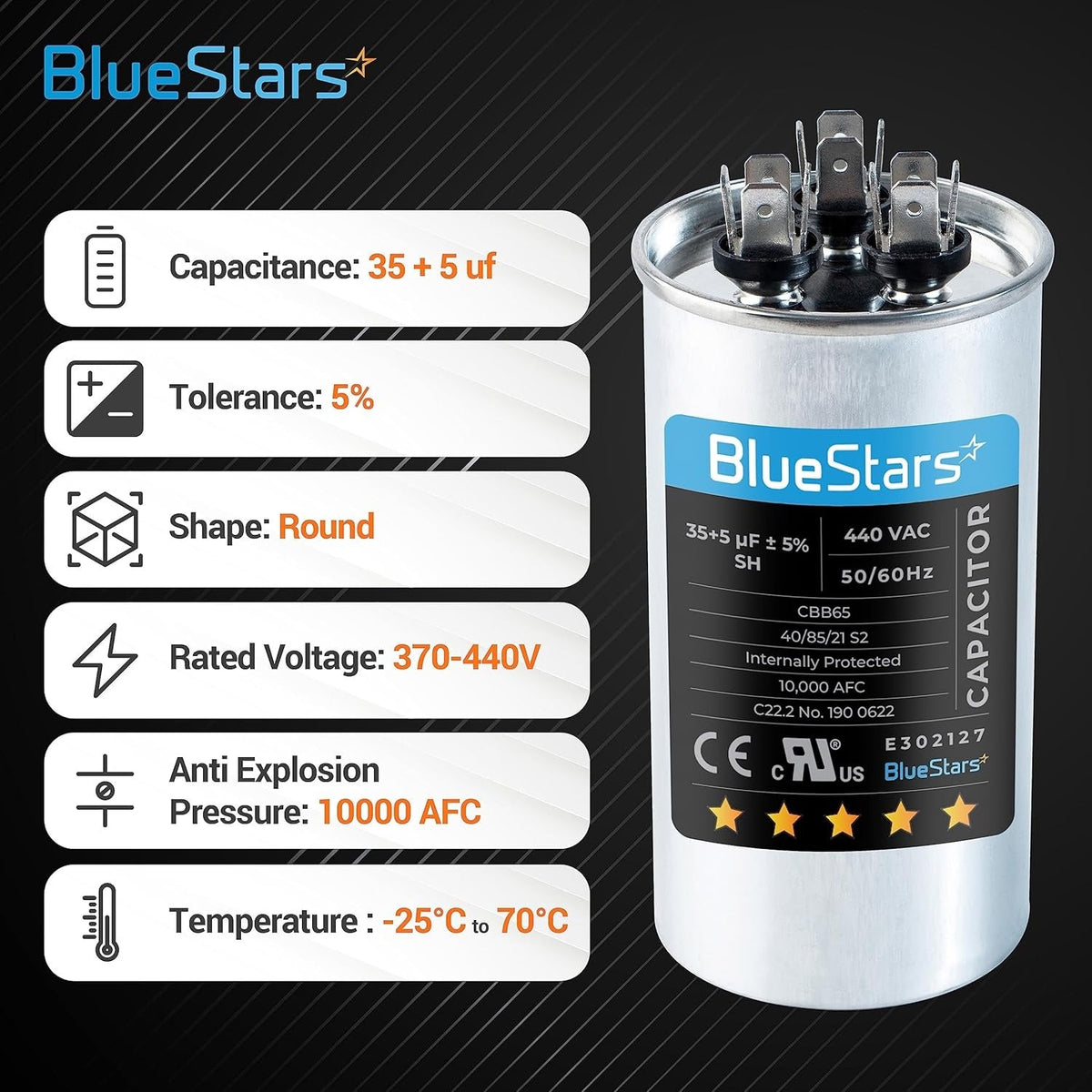
2-pack 35+5 MFD uf 370 VAC or 440 Volt Dual Run Round Capacitor (Source: BlueStars Parts)
>> Read more: Can I Replace My AC Capacitor Myself? Quick DIY Guide
2.4 Thermostat setting or control issue
Sometimes the problem is not the AC itself, but the thermostat failing to send the right signal to the indoor blower fan. Incorrect settings, dead batteries, loose wiring, or communication errors can stop airflow even when the thermostat display says the system is cooling.
Easy checks:
-
Replace the batteries: If the thermostat screen is blank, dim, or flashing a low-battery warning, install fresh batteries first.
-
Set the mode to “Cool”: Make sure the thermostat is not set to “Heat,” “Off,” or fan-only mode.
-
Set the fan to “On”: Switch the fan from “Auto” to “On.” If air starts moving, the blower works, and the issue may be related to the cooling signal.
-
Lower the temperature by 3-5°F: Set the target temperature below the current room temperature to confirm the AC is receiving a cooling request.
Advanced checks:
-
Inspect the G wire: Remove the thermostat from the wall plate and check whether the green wire, which controls the fan, is firmly connected to the G terminal.
-
Reset the thermostat: If the thermostat acts glitchy after a power outage, perform a factory reset according to the user manual.
-
Check the low-voltage signal: If the thermostat still does not trigger airflow, the issue may involve the low-voltage wiring, control board, or blower relay. This should be checked by an HVAC technician.
If the AC starts blowing air after replacing batteries or adjusting the settings, it is likely a simple thermostat issue. If the wiring looks loose, the reset does not work, or the thermostat still cannot trigger the fan, call a technician to avoid damaging the low-voltage control system.
2.5 Blocked return vent, supply vent, or ductwork
An air conditioner needs clear airflow pathways to circulate cool air properly. When return vents are blocked by furniture, supply vents are closed, or ductwork becomes damaged or disconnected, airflow pressure increases and the blower fan cannot move air efficiently. Common signs include weak airflow, uneven cooling, and rooms that stay warm even while the AC is running.
How to fix:
-
Step 1: Clear physical obstructions: Walk through every room in your house. Ensure that all supply vents are fully open and clear away any rugs, heavy drapes, or furniture blocking the large return air grilles.
-
Step 2: Inspect accessible ductwork: Access your attic, basement, or crawlspace. Visually check the duct lines for severe crimps, sharp kinks, or sections that have separated at the metal joints.
-
Step 3: Seal air leaks: Reconnect loose duct joints firmly and seal the seams using specialized aluminum foil tape or mastic sealant. Never use standard cloth duct tape, which dries out and fails.
-
Step 4: Check external intake hoods: Inspect the exterior ventilation openings to ensure they haven't been blocked by fallen leaves, bird nests, or accumulated yard debris.
Expected result: Eliminating air blockages drops system static pressure back to normal operating limits. You should notice better airflow from affected vents if the blockage was the main issue.

Technician sealing leaking AC duct connections with foil tape (Source: BlueStars Parts)
2.6 Indoor unit has no power while the outdoor unit runs
In some cases, the outdoor unit may continue running while the indoor air handler loses power due to a tripped breaker, a shut-off switch issue, or a condensate safety switch triggered by a clogged drain line. When this happens, the outdoor unit operates normally, but no air comes from the vents because the indoor blower remains off.
How to fix:
-
Step 1: Reset the indoor breaker: Find the breaker labeled “Furnace” or “Air Handler” and switch it fully off, then back on.
-
Step 2: Check the emergency switch: Make sure the disconnect switch near the indoor air handler is turned on properly.
-
Step 3: Inspect the float switch: Check the condensate drain pan for standing water that may have triggered the safety float switch.
-
Step 4: Flush the drain line: Use a wet-dry vacuum to clear clogs from the condensate drain line and restore proper drainage.
Caution: If the indoor circuit breaker immediately trips a second time after you reset it, do not force it back on. A repeated trip indicates a dangerous electrical short circuit within your system that requires immediate professional inspection.
2.7 Faulty fan relay, control board, or wiring issue
If the AC still does not blow air after checking the filter, thermostat, and capacitor, the problem may involve the fan relay, control board, wiring, or other electrical components. Because these parts are connected to the system's electrical controls, diagnosis and repair may require specialized tools and experience.
|
Homeowners can safely observe |
Technician should test |
|
Clicking sounds when the thermostat calls for cooling |
Fan relay operation |
|
Burning smells coming from the indoor unit |
Control board functionality |
|
Visible burn marks, melted components, or damaged wires near accessible panels |
Wiring continuity and electrical connections |
|
Blower fan starts and stops intermittently or fails to start altogether |
Low-voltage transformer performance |
How to fix:
-
Step 1: Inspect the circuit board visually: Turn off power to the air handler and remove the access panel. Check the board for burn marks, melted spots, or damaged components.
-
Step 2: Tighten terminal connections: Inspect the “G”, “Y”, and “Common” terminals for loose or disconnected wires. Secure any weak connections carefully.
-
Step 3: Test relay engagement: Restore power and lower the thermostat temperature setting. Listen for a clicking sound from the board, indicating the relay is activating.
-
Step 4: Check for wire damage: Inspect low-voltage wires for fraying, cuts, or pest damage near the cabinet entry points.
Tips: Loose wire connections can cause your blower fan to stop and start randomly. Gently tugging on each wire lead during your inspection helps you pinpoint loose terminals that simply need a quick screwdriver fix.
If damaged relays, faulty control boards, or worn wiring prevent your blower fan from operating properly, replacing the affected electrical components can help restore stable airflow and prevent repeated AC shutdowns. BlueStars Parts offers reliable air conditioner parts such as: OEM-compatible AC control boards, capacitors, relays, and wiring components designed to support long-term cooling system performance.

Air Conditioner Parts Collection from BlueStars Parts (Source: BlueStars Parts)
3. Air Conditioner On but Not Blowing Air: When to Call a Technician
Some issues can be checked at home, such as replacing a dirty filter or adjusting the thermostat. However, if the AC shows signs of electrical failure, motor damage, refrigerant problems, or repeated shutdowns, you should stop troubleshooting and call a technician.
You should stop using the AC immediately if you notice burning smells, repeated breaker trips, a humming unit with no fan movement, or ice that keeps forming on the coil or refrigerant line. Continuing to run the system can damage the compressor, motor, or electrical components and may lead to a more expensive repair.
The table below outlines common warning signs, possible causes, risk levels, and the best action to take next.
|
Problem |
Possible cause |
Risk level |
Best action |
|
Blower motor does not start |
- Internal winding burnout - Seized motor bearings |
High |
- Shut off power at the main panel. - Call a pro to replace the motor. |
|
Coil keeps freezing after filter replacement |
- Systemic refrigerant leak - Faulty thermostatic expansion valve (TXV) |
High |
- Leave the AC off to thaw completely. - Schedule a professional leak test and recharge. |
|
Outdoor unit runs but indoor unit stays silent |
- Blown fan relay switch on control board - Failed indoor low-voltage transformer |
Medium |
- Set the thermostat to "Off" to protect the compressor. - Have a technician isolate the broken circuit. |
|
AC hums, clicks, or smells like burning |
- Short-circuited unit wiring - Fried electronic control board |
Critical |
- Shut off the main house breaker immediately. - Call an emergency HVAC repair service. |
|
Breaker trips when the AC tries to start |
- Shorted compressor winding - Grounded electrical component |
Critical |
- Do NOT reset the breaker again. - Hire a technician to locate the electrical short. |
|
Airflow stops again after restarting the system |
- Overheating blower motor - Malfunctioning high-pressure safety switch |
Medium |
- Keep the unit off to let thermal limits reset. - Request a diagnostic service call. |
In summary, simple AC issues like dirty filters or blocked vents can often be fixed with basic DIY maintenance. However, electrical failures, frozen coils, or burning smells should be inspected by a licensed HVAC technician to avoid serious system damage.
4. FAQs
To help you solve any remaining airflow issues, we’ve answered some of the most common questions homeowners ask about AC systems not blowing air. These quick explanations can help you identify the problem and decide what to do next.
4.1 Why is my outside AC unit running but no air is coming out?
If the outdoor unit is running but no air is blowing inside, the problem is usually with the indoor air handler. A failed blower motor, bad capacitor, or tripped breaker can stop air from moving through the vents. Checking the indoor unit first can help identify the issue quickly.
4.2 Can a dirty filter stop an AC from blowing air?
Yes, a severely clogged air filter can block airflow and cause the blower motor to overheat or the evaporator coil to freeze. This can eventually stop air from coming through the vents completely.
4.3 Should I turn off my AC if it is not blowing air?
You should turn off your air conditioning system at the thermostat immediately if you notice zero airflow. Leaving a malfunctioning system running forces the outdoor compressor to work without proper heat exchange, which can cause permanent, costly mechanical damage.
Fixing an air conditioner on but not blowing air issue early helps protect your cooling system and restore comfort faster. Problems like clogged filters, frozen coils, or faulty blower components should be addressed early to help prevent larger damage and restore proper airflow faster. When replacement parts are needed, BlueStars Parts offers reliable AC repair solutions designed to help keep your cooling system running efficiently.
Contact information:
8 The Green, Ste A, Dover, Delaware 19901-3618, United States
Website: https://bluestarsparts.com/
Read more:
AC Making Noise? 6 Common Causes and How to Fix Quickly
AC Running But Not Cooling: 6 Common Causes and Fixes


